
What Is UEFI? Uses, Purpose, How It Works, and EFI vs UEFI Explained

Updated: Sep 16
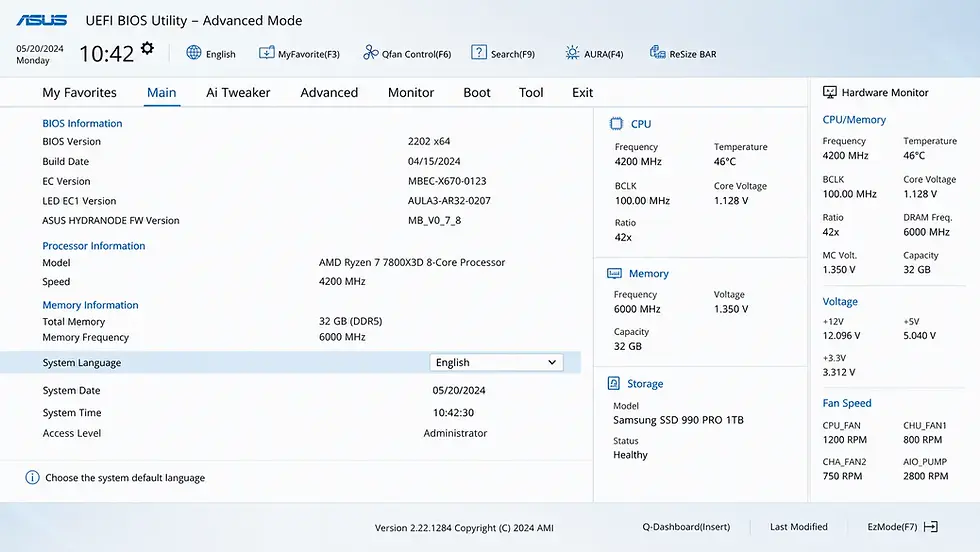
Introduction | UEFI
If you’ve ever entered your computer’s firmware settings, changed boot options, or installed an operating system, you may have encountered the term UEFI. UEFI is a critical part of modern computers, yet many users only know it as “that BIOS screen”. In reality, UEFI is much more advanced than traditional BIOS and plays a major role in how modern systems boot, secure, and manage hardware.
Let’s break down what UEFI is, how it works, what it’s used for, and how it differs from EFI.
What Is UEFI?
UEFI (Unified Extensible Firmware Interface) is a modern firmware interface that initializes hardware and launches the operating system during the computer’s boot process.
👉 In simple terms: UEFI is the software layer that starts your computer before Windows, Linux, or another OS loads. It serves as the successor to legacy BIOS and is now the standard firmware system in most modern PCs.
What Is the Purpose of UEFI?
UEFI exists to provide a more modern, flexible, and secure replacement for traditional BIOS. Its main purposes include:
Initializing hardware during startup
Performing boot-time diagnostics
Locating and launching the operating system bootloader
Managing firmware settings
Enabling modern security features like Secure Boot
How UEFI Works
When you power on your computer:
UEFI starts before the operating system
It initializes essential hardware components
Performs POST (Power-On Self Test)
Detects bootable storage devices
Loads the bootloader from the EFI System Partition
Launches the operating system
Without UEFI, the OS would not know how to start.
Common Uses of UEFI
UEFI performs several essential functions that help modern computers boot securely, initialize hardware, and manage low-level system operations.
Boot Management
Handles startup sequence and boot device selection. It determines which storage device or bootloader should be launched during startup.
Secure Boot
Verifies trusted bootloaders to improve security. This helps prevent unauthorized or malicious software from loading before the operating system.
Firmware Configuration
Allows users to modify system-level settings. Examples include changing boot order, enabling virtualization, or adjusting hardware options.
Hardware Initialization
Prepares CPU, RAM, storage, and peripherals. This ensures all critical hardware is detected and ready before the OS begins loading.
OS Installation Support
Enables modern operating systems to boot properly. Many current operating systems are designed specifically with UEFI compatibility in mind.
Key Features of UEFI
UEFI introduces several modern capabilities that improve system startup, security, storage support, and overall firmware usability compared to legacy BIOS.
Faster Boot Times
Improved hardware initialization compared to BIOS. This helps reduce startup delays and improves overall boot efficiency.
Secure Boot Support
Protects against boot-level malware. It verifies trusted boot components before allowing the operating system to load.
GPT Drive Support
Supports drives larger than 2TB. This enables compatibility with modern high-capacity storage devices.
Graphical Interface
Often includes mouse-friendly firmware menus. This makes navigation and configuration easier for users compared to text-based BIOS screens.
Better Hardware Compatibility
Supports modern hardware standards. UEFI is designed to work efficiently with newer processors, storage technologies, and peripherals.
UEFI vs BIOS
Although both serve the same fundamental purpose during startup, UEFI and BIOS differ significantly in architecture, capabilities, and modern hardware support.
Feature | UEFI | BIOS |
Interface | Modern graphical | Legacy text-based |
Boot Method | EFI bootloader | MBR boot sector |
Max Drive Support | Very large (GPT) | ~2TB limit |
Security | Secure Boot | Minimal |
Expandability | Modular | Limited |
EFI vs UEFI: What’s the Difference?
This is where many users get confused. While the terms are often used interchangeably, EFI and UEFI are related but not technically identical technologies.
EFI (Extensible Firmware Interface)
Original firmware specification developed by Intel
Introduced as BIOS replacement concept
UEFI (Unified Extensible Firmware Interface)
Standardized and improved industry version of EFI
Managed by the UEFI Forum
Used in modern PCs today
👉 In simple terms: UEFI is the modern standardized evolution of EFI.
What Is the EFI System Partition?
UEFI-based systems use a dedicated partition called the EFI System Partition (ESP).
It stores:
Bootloaders
Firmware-related boot files
Boot manager configuration
This partition is essential for UEFI booting.
Why UEFI Matters
UEFI improves:
Startup speed
Security
Large storage support
Modern OS compatibility
Hardware flexibility
Without UEFI, many modern PC features would not work properly.
Common Misconceptions About UEFI
Clarifying these misconceptions helps users better understand UEFI’s role in modern systems and how it differs from older firmware technologies.
UEFI is just BIOS with a new design: UEFI is a significantly different architecture.
EFI and UEFI are identical: UEFI is the evolved standardized version of EFI.
Only advanced users need to know UEFI: UEFI affects every modern PC’s boot process.

Closing Notes
UEFI is the modern firmware standard that powers the startup process of today’s computers. It replaces legacy BIOS with a faster, more secure, and more capable system designed for modern hardware and operating systems.
In simple terms: UEFI is the technology that prepares your hardware and launches your operating system every time your PC boots. Understanding UEFI helps you better troubleshoot, configure, and manage modern computer systems.
Author: Kalyan Bhattacharjee
Category: Tech Reviews | Tech Tutorials | Productivity & Learning | Digital Frameworks
Expertise: Technology Analyst & Digital Research Writer
Source: Research-based content using publicly available technical resources and industry references
📚 Keep exploring - Here are more tech blogs you’ll love:


Comments