
What Is EFI? The Firmware That Helps Your PC Boot

Updated: Sep 16

Introduction | What is EFI
If you’ve ever explored BIOS settings, installed an operating system, or created a bootable USB, you may have come across the term EFI or UEFI. It’s one of those technical concepts many users encounter but few fully understand, even though it plays a critical role every time your computer starts.
Let’s break down what EFI is, how it works, and why it matters.
What Is EFI?
EFI (Extensible Firmware Interface) is a firmware interface that acts as the bridge between a computer’s hardware and its operating system during the boot process.
In simple terms: EFI helps your computer start up and load the operating system. It was developed to replace the traditional BIOS system with a more modern and flexible architecture.
Why EFI Was Introduced
Older computers used BIOS (Basic Input/Output System), which had several limitations:
Limited boot partition support
Slower initialization
Outdated architecture
Limited hardware scalability
EFI was introduced to modernize the firmware layer and overcome these limitations.
How EFI Works
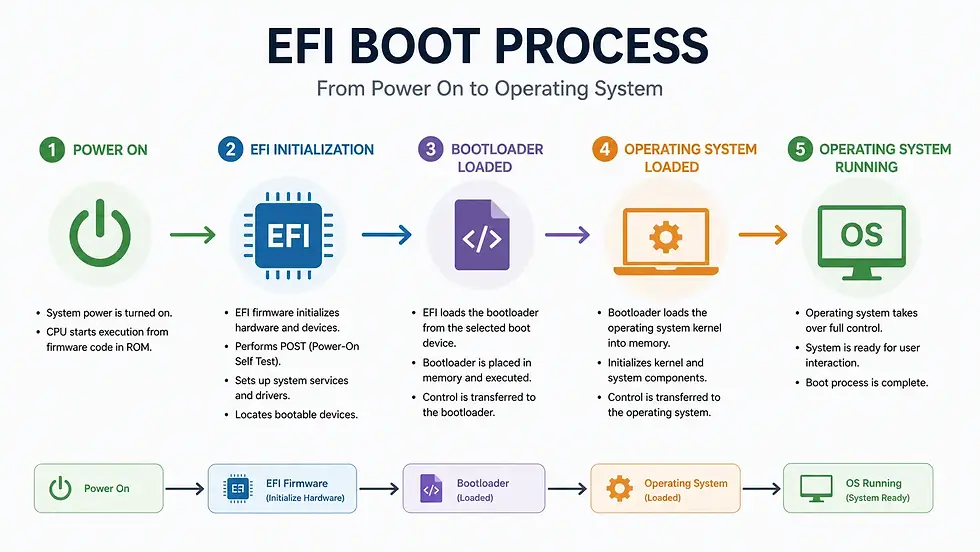
When you power on your computer:
EFI initializes hardware components
It performs startup checks
It identifies bootable devices
It launches the operating system bootloader
👉 Without EFI (or BIOS), the OS would never load.
EFI vs BIOS
EFI is essentially the modern successor to BIOS.
Feature | EFI | BIOS |
Interface | Modern / graphical | Legacy / text-based |
Boot Support | GPT, large drives | MBR, limited drives |
Speed | Faster | Slower |
Security | Secure Boot support | Limited |
Architecture | Modular / extensible | Legacy |
What Is UEFI?
You may hear UEFI more often than EFI. UEFI (Unified Extensible Firmware Interface) is the standardized and evolved version of EFI.
👉 In practice:
EFI = Original concept
UEFI = Modern industry standard
Most modern systems today use UEFI firmware.
Key Features of EFI / UEFI
The following features highlight why EFI and UEFI have become the standard firmware architecture in modern computer systems.
Faster Boot Times
EFI initializes hardware more efficiently. This helps reduce startup delays compared to older legacy BIOS systems.
Secure Boot Support
Helps prevent unauthorized bootloaders or malware. It adds an extra security layer during startup by verifying trusted boot software.
Large Drive Support
Works with GPT partitioning for drives over 2TB. This makes EFI suitable for modern high-capacity storage devices.
Graphical Interface
Often includes mouse support and modern menus. This makes firmware settings easier to navigate than traditional text-based BIOS interfaces.
Better Hardware Compatibility
Designed for modern components and standards. It supports newer processors, storage technologies, and advanced system features more effectively.
What Is the EFI System Partition (ESP)?
Modern EFI systems use a special partition called the EFI System Partition.
This partition stores:
Bootloaders
Firmware-related files
Boot manager data
It is essential for EFI-based booting.
Where EFI Is Used
EFI/UEFI is used in:
Modern desktops
Laptops
Servers
Some tablets/workstations
Virtually all new PCs now rely on UEFI firmware.
Why EFI Matters to Regular Users
Even if you never open firmware settings, EFI affects:
System startup speed
OS installation compatibility
Secure Boot functionality
Drive partitioning support
Understanding EFI is useful when:
Installing Windows/Linux
Troubleshooting boot issues
Configuring dual boot systems
Common Misconceptions About EFI
Understanding these misconceptions helps clarify how EFI differs from older firmware systems and why it matters in modern computing.
EFI and BIOS are the same ❌
They serve similar roles but use different architectures.
EFI only matters to advanced users ❌
It affects every modern computer’s startup process.
UEFI and EFI are completely different ❌
UEFI is the modern standardized form of EFI.
Closing Notes
EFI modernized the way computers boot by replacing the limitations of legacy BIOS with a faster, more secure, and more flexible firmware system.
👉 In simple terms: EFI is the technology that prepares your hardware and launches your operating system when your computer starts. Without it, modern PCs wouldn’t boot the way they do today.
📚 Keep exploring - Here are more tech blogs you’ll love:


Comments