
What Is a Self-Decrypting Archive? Benefits, Uses, and Safety Tips

Updated: 4 days ago
Overview | Self-Decrypting Archive
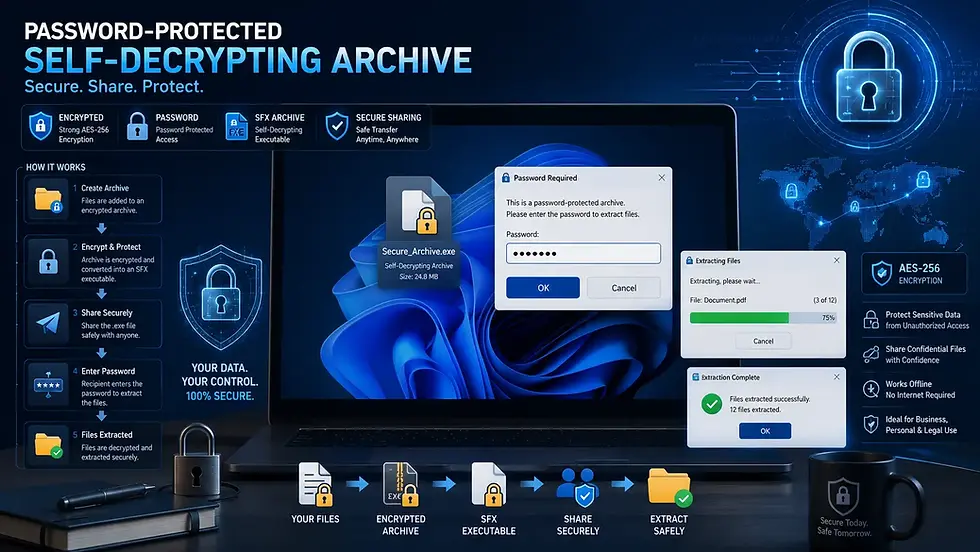
Sharing encrypted files is a common practice for protecting sensitive information. However, not everyone has archive software installed to open encrypted ZIP or 7Z files. That's where a Self-Decrypting Archive (SDA) becomes useful. A self-decrypting archive combines encrypted files with a built-in extraction program, allowing users to decrypt and extract contents without installing additional software.
In this guide, we'll explain what a self-decrypting archive is, how it works, its advantages, limitations, and important safety considerations.
What Is a Self-Decrypting Archive?
A Self-Decrypting Archive (SDA) is a compressed and encrypted archive that contains its own extraction utility. Unlike traditional archives that require separate software such as archive managers, a self-decrypting archive can be opened directly by the recipient.
In most cases, SDAs are distributed as executable files, commonly using the .exe
file format on Windows. Once launched, the built-in extractor handles the decryption and extraction process automatically.
How Does a Self-Decrypting Archive Work?
The process is relatively simple.
File Compression & Encryption
Files are compressed and optionally encrypted by the creator.
Self-Extracting Executable
A self-extracting executable is generated that contains both:
The archived files
The extraction program
File Opening
The recipient opens the archive.
Password Protection
If password protection is enabled, the user enters the password.
Decryption & Extraction
The archive decrypts and extracts the files to the selected location. This makes the process convenient for users who may not have specialized archive software installed.
Why Are Self-Decrypting Archives Used?
Self-decrypting archives are designed to simplify secure file sharing.
Common use cases include:
Sending confidential documents
Sharing software packages
Business file transfers
Secure backups
Enterprise deployments
Internal corporate communications
They are particularly useful when sending files to non-technical users.
Pros and Cons of Self-Decrypting Archives
While self-decrypting archives offer convenience and ease of use, they also come with compatibility and security considerations that users should understand.
Advantages of Self-Decrypting Archives
Easy to Use: Recipients do not need to install separate extraction software. The archive contains everything required for decryption and extraction.
Password Protection: Many SDAs support encryption and password protection. This adds an additional security layer when sharing sensitive files.
Convenient Distribution: A single executable file is often easier to distribute than explaining how to install and use archive software.
Faster Deployment: In enterprise environments, SDAs can simplify software installation and file deployment processes.
Disadvantages of Self-Decrypting Archives
While useful, SDAs also have limitations.
Platform Restrictions
Most self-decrypting archives are designed for Windows. Users on:
Linux
macOS
Mobile devices
May not be able to run the executable directly.
Larger File Size: Because the extraction program is embedded within the archive, SDA files are often slightly larger than standard ZIP or 7Z archives.
Email Blocking: Many email providers block executable attachments due to security concerns. This can make sharing SDA files more difficult.
Security Warnings: Since SDAs use executable files, some antivirus solutions may perform additional scans or display security warnings before allowing them to run.
Self-Decrypting Archive vs Traditional ZIP Files
For broad compatibility, ZIP archives are usually preferred. For convenience and ease of use, SDAs can be advantageous.
Feature | Self-Decrypting Archive | Traditional ZIP |
Requires Extraction Software | No | Yes |
Password Protection | Often Supported | Supported |
Ease of Use | High | Moderate |
Cross-Platform Compatibility | Limited | Excellent |
Email Friendly | Less Friendly | More Friendly |
File Size | Slightly Larger | Smaller |
Are Self-Decrypting Archives Safe?
This is one of the most common questions surrounding SDAs. The answer is: Yes, self-decrypting archives can be safe when obtained from trusted sources.
However, users should exercise caution because SDAs are executable files. Cybercriminals sometimes disguise malicious software as:
Self-extracting archives
Self-decrypting archives
Software installers
When users run these files, malware may execute instead of a legitimate extraction process.
Safety Tips Before Opening an SDA
Before running any self-decrypting archive:
Verify the Source
Only open archives received from trusted individuals, organizations, or software vendors. Unknown or unverified sources increase the risk of malware and other security threats.
Scan the File
Use updated antivirus software to scan the archive before execution. This simple step can help detect malicious code before it runs on your system.
Check File Extensions
Ensure the file originates from a legitimate source and verify its intended purpose. Be especially cautious if the file extension differs from what you were expecting to receive.
Avoid Suspicious Emails
Be cautious of unexpected executable attachments arriving through email or messaging platforms. Cybercriminals often use urgent or misleading messages to encourage users to open harmful files.
Verify Digital Signatures
For business or software distributions, checking code signatures can provide additional assurance that the file has not been modified. A valid digital signature helps confirm the file's authenticity and integrity.
How to Create a Self-Decrypting Archive
Several archive utilities support creating self-decrypting archives.
Common examples include: WinRAR, 7-Zip (through self-extracting modules), WinZip etc. The exact process varies by software, but generally involves:
Selecting files
Enabling archive creation
Choosing self-extracting or self-decrypting options
Setting encryption and passwords if required
The software then generates a standalone executable archive.
When Should You Use a Self-Decrypting Archive?
A self-decrypting archive is often a good choice when:
Recipients may not have archive software installed
Ease of use is a priority
Password-protected distribution is required
Files are primarily being shared with Windows users
However, if compatibility across multiple operating systems is important, a standard ZIP archive may be the better option.

Closing Notes
A Self-Decrypting Archive (SDA) combines encrypted files and an extraction utility into a single package, making secure file sharing easier for recipients who may not have archive software installed. While SDAs offer convenience, password protection, and simplified distribution, they also come with limitations such as platform compatibility concerns and security considerations related to executable files.
When used responsibly and obtained from trusted sources, self-decrypting archives remain a practical solution for securely sharing files, software packages, and confidential documents in both personal and professional environments.
Author: Kalyan Bhattacharjee
Category: Tech Reviews | Tech Tutorials | File Storage | Cybersecurity
Expertise: Technology Analyst & Digital Research Writer
Source: Research-based content using publicly available technical resources and industry references
📚 Keep exploring - Here are more tech blogs you’ll love:


Comments