.png)
What Is a JAR File? Everything You Need to Know

Updated: Sep 16

Getting Started | What Is a JAR File?
If you've ever downloaded Java-based software, mods, development tools, or enterprise applications, you've likely encountered a file ending in .jar. For many users, JAR files can be confusing because they don't always open like ordinary documents or programs. In reality, JAR files play an important role in the Java ecosystem and are widely used to package and distribute Java applications.
In this guide, we'll explain what a JAR file is, how it works, how to open it, and whether it's safe to use.
What Is a JAR File?
A JAR (Java Archive) file is a package format used to bundle multiple files into a single compressed archive.
The format was developed as part of the Java platform and is commonly used to distribute:
Java applications
Libraries
Plugins
Game modifications (mods)
Enterprise software components
A JAR File Can Contain
Compiled Java classes
Resources
Images
Configuration files
Metadata
Think of a JAR file as a specialized ZIP archive designed specifically for Java applications.
What Does JAR Stand For?
JAR stands for: Java ARchive
The format helps developers package everything needed for a Java application into a single file. This simplifies:
Distribution
Installation
Deployment
Version management
How Does a JAR File Work?
When a developer creates a Java application, the source code is compiled into:
.class files
These files are then packaged into a JAR archive along with supporting resources.
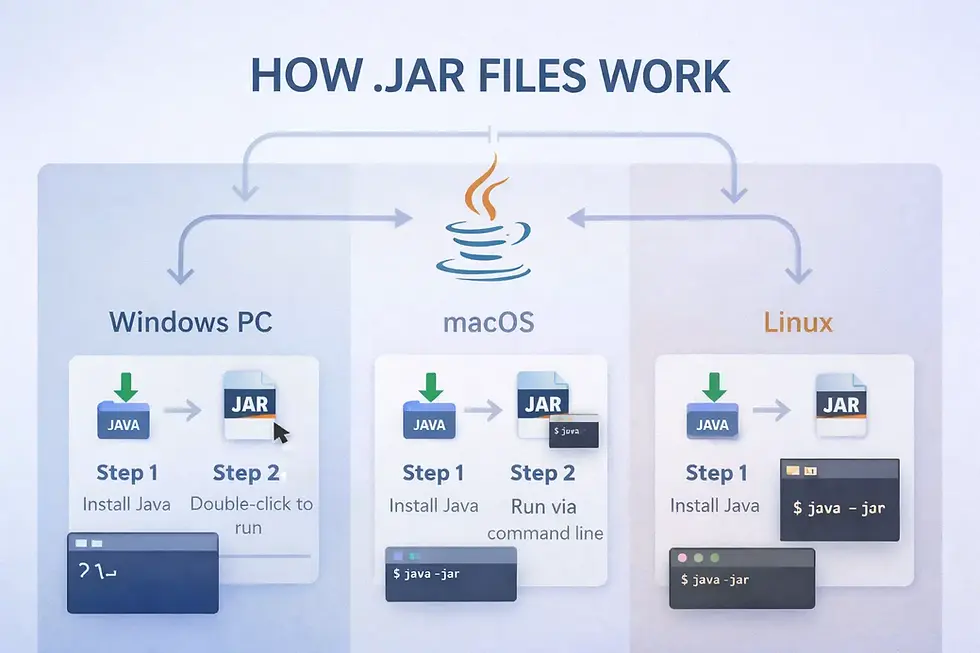
If the JAR is configured as an executable application, users can launch it using the Java Runtime Environment (JRE). The JAR acts as a container that keeps all required components together.
What's Inside a JAR File?
A typical JAR file may include:
Application.class
config.properties
images/
resources/
META-INF/
One important directory is: META-INF. This folder often contains:
Manifest information
Application metadata
Version details
Execution instructions
The manifest file helps Java determine how the application should be launched.
Executable vs Non-Executable JAR Files
Not all JAR files are designed to be opened directly.
Executable JAR Files
These contain a designated main class and can function as standalone applications. Users can often launch them directly if Java is installed.
Examples include:
Desktop utilities
Java games
Educational software
Development tools
Non-Executable JAR Files
These JAR files are typically used as supporting libraries and resources that other Java applications depend on rather than applications users run directly.
These act as software libraries rather than complete applications.
They provide reusable code that other Java applications can use.
Developers frequently work with these types of JAR files during software development.
How to Open a JAR File
Opening a JAR file typically requires Java to be installed on your system. While the exact process varies slightly between Windows, macOS, and Linux, it is usually straightforward once the Java Runtime Environment (JRE) is properly configured.
If you're looking for step-by-step instructions, troubleshooting tips, and platform-specific methods, check out our complete guide:
This detailed tutorial covers everything from installing Java to fixing common JAR file opening errors.
Can You Extract a JAR File?
Yes. Since a JAR file is essentially a compressed archive, it can often be opened using archive tools such as:
7-Zip
WinRAR
WinZip
This allows users to inspect the contents without executing the application. Developers frequently use this method to examine application resources and configuration files.
Common Uses of JAR Files
JAR files remain widely used across many areas of software development.
Desktop Applications
Many Java-based utilities and tools are distributed as JAR files. This allows developers to package an entire application into a single, portable file.
Minecraft Mods
One of the most well-known uses of JAR files is within the Minecraft modding community. Many mods and mod loaders are distributed in JAR format. Players often install these JAR files to add new features, content, and gameplay mechanics.
Enterprise Software
Large business applications often use JAR files to package modules and software components. This helps organizations manage complex software systems more efficiently.
Software Libraries
Developers use JAR files to distribute reusable Java libraries that can be imported into projects. These libraries save development time by providing pre-built functionality that can be integrated into applications.
Advantages of JAR Files
These benefits have helped make JAR files one of the most widely used formats for packaging and distributing Java applications.
Simplified Distribution
Everything required for an application can be packaged into a single file. This makes software sharing and installation much more convenient for users.
Compression
JAR files support compression, helping reduce file size. Smaller files are generally faster to download, store, and distribute.
Portability
Java applications packaged as JAR files can often run across multiple operating systems. This "write once, run anywhere" philosophy has been one of Java's biggest strengths. As long as Java is installed, the same application can typically run on Windows, macOS, and Linux.
Easier Deployment
Developers can distribute updates and software packages more efficiently. Managing a single archive file also simplifies version control and software maintenance.
Are JAR Files Safe?
JAR files themselves are not inherently dangerous. However, because they can contain executable code, users should exercise caution.
A malicious JAR file can potentially:
Execute unwanted actions
Install malware
Modify system settings
Download harmful content
This is similar to the risks associated with executable files.
Safety Tips Before Opening a JAR File
Because JAR files can contain executable Java code, it's important to follow basic security practices before opening files from unknown or untrusted sources.
Download From Trusted Sources
Only obtain JAR files from reputable websites, software vendors, or trusted developers. Downloading files from unofficial sources significantly increases the risk of malware or modified software.
Scan Files Before Running
Use updated antivirus software to scan downloaded files. A quick scan can help identify potential threats before the application is executed.
Verify the Publisher
If possible, confirm the authenticity of the developer or project distributing the JAR file. Checking official websites and project documentation can help verify legitimacy.
Avoid Unknown Attachments
Be cautious of JAR files received unexpectedly through email or messaging platforms. Attackers sometimes disguise malicious software as legitimate Java applications.
Keep Java Updated
Using the latest Java version helps protect against known vulnerabilities and security issues. Regular updates also improve compatibility and overall application stability.
Common Problems When Opening JAR Files
Many users encounter issues such as:
JAR files not opening
Double-clicking does nothing
Incorrect file associations
Missing Java installation
In most cases, installing or updating Java resolves the problem.
Sometimes manually launching the file using:
java -jar filename.jar
Can help identify specific errors.
JAR File vs ZIP File
Although both formats are similar internally, JAR files are specifically designed for Java applications.
Feature | JAR File | ZIP File |
Compression | Yes | Yes |
Executable Java Applications | Yes | No |
Java Metadata Support | Yes | No |
Software Libraries | Yes | No |
General File Archiving | Limited | Excellent |

Key Takeaways
A JAR file is a Java Archive used to package applications, libraries, resources, and configuration files into a single compressed file. It remains one of the most widely used distribution formats in the Java ecosystem, powering desktop software, enterprise applications, development tools, and gaming communities.
While JAR files are generally safe when obtained from trusted sources, they can contain executable code and should be treated with the same caution as other application files. Understanding how JAR files work can help users safely run Java-based software and troubleshoot common issues across Windows, macOS, and Linux.
Author: Kalyan Bhattacharjee
Category: Programming | Tech Learning | Tech Tutorials | Digital Frameworks
Expertise: Technology Analyst & Digital Research Writer
Source: Research-based content using publicly available technical resources and industry references
📚 Keep exploring - Here are more tech blogs you’ll love:


Comments