
How to Find Duplicate Records in SQL: A Complete Guide With Examples

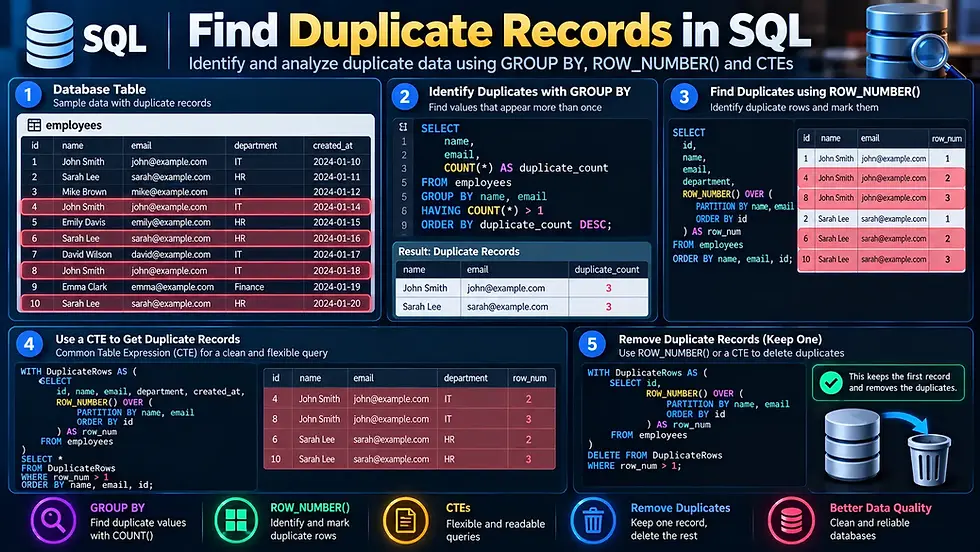
Quick Overview | Find Duplicate Records in SQL
Duplicate records are a common problem when working with SQL databases. They can appear because of repeated data imports, missing constraints, application errors, manual data entry, or changes made during data migration. Finding duplicates is usually straightforward once you understand how GROUP BY, COUNT(), and HAVING work together.
For more complex cases, SQL techniques such as window functions, Common Table Expressions (CTEs), and self-joins can help identify exactly which rows are duplicated. In this guide, we'll explore several practical ways to find duplicate records in SQL, with examples you can adapt to your own database.
Understanding Duplicate Records in SQL
A duplicate record is generally a row where two or more records contain the same value in one or more columns that should uniquely identify the data.
For example, consider an employees table:
id | name | department | |
1 | John Smith | john@example.com | Sales |
2 | Sarah Lee | sarah@example.com | HR |
3 | John Smith | john@example.com | Sales |
4 | David Brown | david@example.com | IT |
Rows 1 and 3 contain the same name, email, and department values. If email is supposed to be unique, these records represent a duplicate. However, whether a record is actually a duplicate depends on which columns define uniqueness for your data.
Why Do Duplicate Records Occur?
Duplicate data can enter a database for several reasons, including:
Repeated data imports
Manual data entry
Application bugs
Missing UNIQUE constraints
Incorrect database migrations
Repeated form submissions
Synchronization problems between systems
Improper ETL or data-processing workflows
Identifying the reason for duplication is important because simply removing duplicate rows doesn't prevent the problem from happening again.
Find Duplicate Records Using GROUP BY and COUNT()
One of the easiest ways to find duplicates is to combine GROUP BY with COUNT().
Suppose you want to find duplicate email addresses in an employees table:
SELECT email, COUNT(*) AS duplicate_count
FROM employees
GROUP BY email
HAVING COUNT(*) > 1;
How This Query Works
The query groups records with the same email address:
GROUP BY emailThen COUNT(*) counts how many records belong to each group:
COUNT(*)Finally, this condition keeps only groups that appear more than once:
HAVING COUNT(*) > 1The result might look like:
duplicate_count | |
john@example.com | 2 |
alex@example.com | 3 |
This tells you which values are duplicated and how many times they occur.
Find Duplicates Based on Multiple Columns
Sometimes one column isn't enough to determine whether two records are duplicates.
For example, suppose an orders table contains:
id | customer_id | product_id | order_date |
101 | 25 | 500 | 2026-09-20 |
102 | 25 | 500 | 2026-09-20 |
103 | 25 | 501 | 2026-09-20 |
If the combination of customer_id, product_id, and order_date should be unique, you can check for duplicates using:
SELECT customer_id, product_id, order_date, COUNT(*) AS duplicate_count
FROM orders
GROUP BY customer_id, product_id, order_date
HAVING COUNT(*) > 1;
This checks the combination of columns, rather than looking at each column independently.
Find Complete Duplicate Rows
If you want to identify records where several columns contain exactly the same values, include those columns in the GROUP BY clause.
For example:
SELECT name, email, department, COUNT(*) AS duplicate_count
FROM employees
GROUP BY name, email, department
HAVING COUNT(*) > 1;
This identifies groups where the combination of name, email, and department occurs more than once. The primary key, such as id, is normally excluded from this comparison because it is expected to be different for separate rows.
Find the Actual Duplicate Rows
GROUP BY is useful for finding duplicate values or groups, but sometimes you need to see the actual rows that contain those duplicates.
A common approach is to use a subquery:
SELECT *
FROM employees
WHERE email IN (
    SELECT email
    FROM employees
    GROUP BY email
    HAVING COUNT(*) > 1
);
This returns the complete employee records associated with duplicated email addresses. For example:
id | name | department | |
1 | John Smith | john@example.com | Sales |
3 | John Smith | john@example.com | Sales |
This is often more useful when you're investigating or cleaning duplicate data.
Find Duplicates Using ROW_NUMBER()
For more advanced duplicate detection, the ROW_NUMBER() window function can be extremely useful.
For example:
SELECT *,
       ROW_NUMBER() OVER (
           PARTITION BY email
           ORDER BY id
       ) AS row_num
FROM employees;
This assigns a number to each record within the same email group. The first occurrence gets 1, the next gets 2, then 3, and so on.
You can then use a CTE to identify records after the first occurrence:
WITH duplicates AS (
    SELECT *,
           ROW_NUMBER() OVER (
               PARTITION BY email
               ORDER BY id
           ) AS row_num
    FROM employees
)
SELECT *
FROM duplicates
WHERE row_num > 1;
This returns the additional duplicate rows, while keeping the first occurrence out of the result.
Why ROW_NUMBER() Is Useful
ROW_NUMBER() is particularly useful when you need to distinguish between:
The first record
Duplicate records
Which record should be retained
Which records may need to be removed
This makes it more flexible than simply using GROUP BY.
Find Duplicates Using a Common Table Expression
A Common Table Expression (CTE) can make duplicate-detection queries easier to read and modify.
For example:
WITH duplicate_emails AS (
    SELECT email
    FROM employees
    GROUP BY email
    HAVING COUNT(*) > 1
)
SELECT e.*
FROM employees e
JOIN duplicate_emails d
    ON e.email = d.email;
The first part identifies duplicate email addresses:
WITH duplicate_emails AS (
    SELECT email
    FROM employees
    GROUP BY email
    HAVING COUNT(*) > 1
)
The second part joins those values back to the original table to retrieve the complete records.
This approach can be especially helpful when duplicate detection becomes part of a larger data-cleaning query.
Find Duplicate Records Using a Self-Join
Another approach is to compare rows within the same table using a self-join.
For example:
SELECT a.*
FROM employees a
JOIN employees b
    ON a.email = b.email
   AND a.id > b.id;
Here, the table is referenced twice using the aliases a and b.
The condition:
a.id > b.idHelps prevent the same pair from being returned twice and ensures that the row with the higher ID is treated as the duplicate. Self-joins can be useful when you need more control over how duplicate rows are compared.
Find Duplicate Values With NULLs
NULL values require some additional consideration when checking for duplicates.
For example:
SELECT email, COUNT(*) AS duplicate_count
FROM employees
GROUP BY email
HAVING COUNT(*) > 1;
A GROUP BY query can group NULL values together, but comparisons involving NULL behave differently from ordinary values in SQL.
For example:
WHERE email = NULLdoes not correctly find rows where email is NULL.
Instead, use:
WHERE email IS NULLWhen designing duplicate checks, consider whether multiple NULL values should actually be treated as duplicates according to your application's rules.
Find Duplicates in Specific Columns
You don't always need to search the entire table. Often, one particular field is the source of the duplication.
For example, to find duplicate phone numbers:
SELECT phone_number, COUNT(*) AS duplicate_count
FROM customers
GROUP BY phone_number
HAVING COUNT(*) > 1;
To find duplicate usernames:
SELECT username, COUNT(*) AS duplicate_count
FROM users
GROUP BY username
HAVING COUNT(*) > 1;
To find duplicate product codes:
SELECT product_code, COUNT(*) AS duplicate_count
FROM products
GROUP BY product_code
HAVING COUNT(*) > 1;
The basic pattern remains the same:
SELECT column_name, COUNT(*)
FROM table_name
GROUP BY column_name
HAVING COUNT(*) > 1;
Find Duplicate Records While Keeping the First Row
If your goal is data cleanup, you may want to identify duplicate rows while keeping the earliest or preferred record.
For example:
WITH ranked_records AS (
    SELECT *,
           ROW_NUMBER() OVER (
               PARTITION BY email
               ORDER BY id
           ) AS row_num
    FROM employees
)
SELECT *
FROM ranked_records
WHERE row_num > 1;
Here, the record with the lowest id receives row_num = 1, while later records receive higher numbers. This doesn't delete anything. It simply identifies the records that could potentially be removed.
Always review duplicate records before deleting them, because records that look identical may have different business meaning or related data elsewhere in the database.
How to Prevent Duplicate Records
Finding duplicates is useful, but preventing them is even better.
Use UNIQUE Constraints
If a column must contain unique values, a UNIQUE constraint can enforce that rule at the database level.
For example:
ALTER TABLE employees
ADD CONSTRAINT unique_employee_email UNIQUE (email);
This prevents multiple records from having the same email address, assuming the database's handling of NULL and the constraint semantics fit your requirements.
Validate Data Before Inserting
Applications should validate user input before inserting records into the database. For example, an application might check whether an email already exists before creating a new customer record.
However, application-level checks alone aren't always sufficient because concurrent requests can still create race conditions. Database constraints provide an important additional layer of protection.
Use Appropriate Primary Keys
Every table should generally have a suitable primary key or another reliable mechanism for identifying individual records. A primary key doesn't automatically prevent duplicate business data, however. Two different IDs can still belong to two records with the same email, product code, or other business identifier.
Which SQL Method Should You Use?
Different duplicate-detection techniques are useful for different situations.
Method | Best For |
GROUP BY + COUNT() | Finding duplicated values |
Multiple-column GROUP BY | Finding duplicate combinations |
Subquery | Retrieving complete duplicate records |
ROW_NUMBER() | Identifying specific duplicate rows |
CTE | Organizing more complex duplicate queries |
Self-join | Comparing rows within the same table |
UNIQUE constraint | Preventing future duplicates |
For a simple duplicate check, GROUP BY and HAVING COUNT(*) > 1 are usually the best place to start.
Common Mistakes When Finding SQL Duplicates
Duplicate detection can produce misleading results if you don't clearly define what counts as a duplicate.
Checking Only One Column
Two records can have the same name but represent completely different people.
For example:
John Smith
John Smith
Doesn't necessarily mean the records are duplicates. You may need to compare a combination of fields such as email, phone number, or customer ID.
Including the Primary Key
If you include a unique id column in your duplicate comparison, every row will naturally be different.
For example, this query may fail to identify the duplicates you're looking for:
GROUP BY id, name, emailInstead, exclude the unique identifier when determining whether the business data is duplicated.
Deleting Duplicates Immediately
Finding duplicates and deleting duplicates are two different operations. Always inspect the results first and determine whether the records are truly duplicates before performing a DELETE.

Key Takeaways
Finding duplicate records in SQL doesn't have to be complicated. For many everyday situations, the combination of GROUP BY, COUNT(), and HAVING provides a simple way to identify repeated values. When you need more control, ROW_NUMBER(), CTEs, subqueries, and self-joins can help you locate specific duplicate rows and decide which records should be retained.
More importantly, duplicate detection should be paired with good database design. Appropriate primary keys, unique constraints, validation, and application logic can help prevent unwanted duplicates from appearing in the first place.
Author: Kalyan Bhattacharjee
Category: Tech Learning | Programming | Tech Tutorials
Expertise: Technology Analyst & Digital Research Writer | 5+ Years of Experience
Source: Research-based content using publicly available technical resources and industry references
FAQ About Finding Duplicate Records in SQL
Here are some common questions about finding duplicate records in SQL, including GROUP BY, COUNT(), ROW_NUMBER(), duplicate columns, and preventing duplicate data.
How do I find duplicate records in SQL?
Ans: The most common approach is to use GROUP BY with COUNT() and filter the results using HAVING COUNT(*) > 1.
SELECT email, COUNT(*)
FROM employees
GROUP BY email
HAVING COUNT(*) > 1;
How do I find duplicate rows based on multiple columns?
Ans: Include the columns that define uniqueness in the GROUP BY clause.
SELECT name, email, department, COUNT(*)
FROM employees
GROUP BY name, email, department
HAVING COUNT(*) > 1;
How can I find actual duplicate rows in SQL?
Ans: You can use a subquery or CTE to identify duplicated values and then retrieve the corresponding records from the original table.
How does ROW_NUMBER() help find duplicate records?
Ans: ROW_NUMBER() assigns a sequential number to rows within each duplicate group. Records with a number greater than 1 can then be identified as additional occurrences.
How can I prevent duplicate records in SQL?
Ans: Use appropriate database constraints, particularly UNIQUE constraints for fields that must contain unique values. Application-level validation can provide an additional layer of protection.
Can SQL find duplicates based on only one column?
Ans: Yes, You can group the table by that column and use HAVING COUNT(*) > 1 to find values that occur more than once.
Should I delete duplicate records after finding them?
Ans: Not immediately, First verify that the records are genuinely duplicates and determine which record should be retained. Deleting data without reviewing the results can cause unintended data loss.


Comments