
How to Delete Duplicate Records in SQL: Safe Methods & Examples


Intro | How to Delete Duplicate Records in SQL
Duplicate records can create inaccurate reports, inconsistent customer data, unnecessary storage usage, and problems for applications that expect certain values to be unique. Finding duplicates is only the first step, once you've confirmed that records are truly duplicated, you may also need to remove the unwanted rows. SQL provides several ways to delete duplicate records while keeping one preferred copy.
Common approaches include ROW_NUMBER(), CTEs, self-joins, and database-specific techniques. In this guide, we'll explore practical and safer methods for deleting duplicate records in SQL, explain how each approach works, and cover important precautions to take before deleting data.
Understanding Duplicate Records Before Deleting Them
Before deleting anything, you need to define what actually makes two records duplicates.
Consider an employees table:
id | name | department | |
1 | John Smith | john@example.com | Sales |
2 | Sarah Lee | sarah@example.com | HR |
3 | John Smith | john@example.com | Sales |
4 | David Brown | david@example.com | IT |
Here, rows 1 and 3 contain the same name, email, and department. If email is supposed to be unique, row 3 could be considered a duplicate.
However, the id values are different. That's normal because the primary key identifies individual rows rather than determining whether the business data is duplicated.
So, before deleting duplicates, decide which columns define a duplicate in your particular table.
Always Find Duplicates Before Deleting Them
It's a good practice to identify and review duplicate records before running a DELETE statement.
For example:
SELECT email, COUNT(*) AS duplicate_count
FROM employees
GROUP BY email
HAVING COUNT(*) > 1;
This shows which email addresses appear more than once.
To retrieve the complete records:
SELECT *
FROM employees
WHERE email IN (
    SELECT email
    FROM employees
    GROUP BY email
    HAVING COUNT(*) > 1
);
Review these results carefully before moving on to deletion.
Delete Duplicate Records Using ROW_NUMBER()
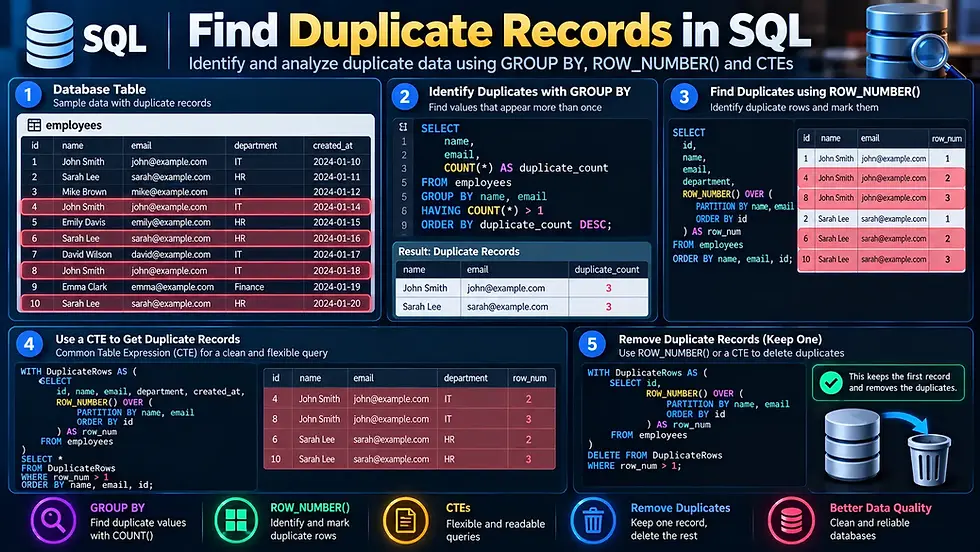
One of the most flexible approaches is to use the ROW_NUMBER() window function.
Suppose you want to keep the record with the lowest id for each email address and delete the additional records. You can first identify them with:
WITH ranked_records AS (
    SELECT *,
           ROW_NUMBER() OVER (
               PARTITION BY email
               ORDER BY id
           ) AS row_num
    FROM employees
)
SELECT *
FROM ranked_records
WHERE row_num > 1;
The ROW_NUMBER() function numbers records within each email group.
For example:
id | row_num | |
1 | john@example.com | 1 |
3 | john@example.com | 2 |
5 | john@example.com | 3 |
The first record is kept, while records with row_num > 1 are candidates for deletion.
Delete the Duplicate Rows
In database systems that support deleting from a CTE or equivalent pattern, you can use a variation such as:
WITH ranked_records AS (
    SELECT *,
           ROW_NUMBER() OVER (
               PARTITION BY email
               ORDER BY id
           ) AS row_num
    FROM employees
)
DELETE FROM ranked_records
WHERE row_num > 1;
However, DELETE syntax and CTE support vary between SQL database systems. For production work, use the syntax appropriate for your database.
The important logic is: Partition duplicates → order the records → keep row 1 → remove rows greater than 1.
Delete Duplicates Using a Self-Join
A self-join can also be used to remove duplicate records.
For example, if id is unique and you want to keep the record with the lowest ID:
DELETE e1
FROM employees e1
JOIN employees e2
    ON e1.email = e2.email
   AND e1.id > e2.id;
The query compares the table against itself.
The condition:
e1.id > e2.idmeans that the row with the larger ID is treated as the duplicate, while the row with the smaller ID is retained.
Why Use a Self-Join?
This method can be useful when:
You have a unique ID column
You want to keep the earliest record
Your database supports this DELETE ... JOIN syntax
The duplicate condition is relatively simple
Keep in mind that the exact syntax isn't universal across SQL database systems.
Delete Duplicates With a CTE
A Common Table Expression can make duplicate-cleaning queries easier to organize.
For example:
WITH duplicates AS (
    SELECT id,
           ROW_NUMBER() OVER (
               PARTITION BY email
               ORDER BY id
           ) AS row_num
    FROM employees
)
DELETE FROM employees
WHERE id IN (
    SELECT id
    FROM duplicates
    WHERE row_num > 1
);
This approach identifies duplicate IDs first and then deletes those IDs from the original table. The exact behavior and supported syntax can vary by database system, so check the documentation for your SQL platform.
Delete Duplicate Records Based on Multiple Columns
Sometimes duplicates aren't determined by a single column.
Suppose the following combination should be unique:
customer_id
product_id
order_date
You can identify duplicates using:
SELECT customer_id,
       product_id,
       order_date,
       COUNT(*) AS duplicate_count
FROM orders
GROUP BY customer_id, product_id, order_date
HAVING COUNT(*) > 1;
To remove duplicates while keeping one record, you can use ROW_NUMBER():
WITH ranked_orders AS (
    SELECT id,
           ROW_NUMBER() OVER (
               PARTITION BY customer_id, product_id, order_date
               ORDER BY id
           ) AS row_num
    FROM orders
)
DELETE FROM orders
WHERE id IN (
    SELECT id
    FROM ranked_orders
    WHERE row_num > 1
);
This approach is useful when a combination of columns, not one individual field defines uniqueness.
Delete Duplicates While Keeping the Latest Record
You don't always want to keep the oldest record. For example, suppose an employees table contains multiple records for the same email address, but you want to keep the most recently created one.
You could rank the records in descending order:
WITH ranked_records AS (
    SELECT id,
           ROW_NUMBER() OVER (
               PARTITION BY email
               ORDER BY created_at DESC
           ) AS row_num
    FROM employees
)
DELETE FROM employees
WHERE id IN (
    SELECT id
    FROM ranked_records
    WHERE row_num > 1
);
Here, the newest record receives row_num = 1, while older duplicates are assigned higher numbers.
This illustrates an important principle: Decide which record to keep before deciding which records to delete.
Delete Duplicates While Keeping the Oldest Record
If you prefer to keep the earliest record, order by the creation date in ascending order:
WITH ranked_records AS (
    SELECT id,
           ROW_NUMBER() OVER (
               PARTITION BY email
               ORDER BY created_at ASC
           ) AS row_num
    FROM employees
)
DELETE FROM employees
WHERE id IN (
    SELECT id
    FROM ranked_records
    WHERE row_num > 1
);
The oldest record receives row_num = 1, and the later records become deletion candidates.
What About Completely Identical Rows?
Sometimes duplicate records contain identical values across all relevant columns.
For example:
name | department | |
John Smith | john@example.com | Sales |
John Smith | john@example.com | Sales |
If there is no unique identifier to distinguish the rows, deleting exactly one occurrence becomes more database-specific. In such cases, a ROW_NUMBER() approach can often help if the database exposes a suitable unique row identifier.
Otherwise, you may need a staging table, temporary table, or database-specific feature. This is one reason why having a proper primary key is important for reliable data management.
Be Careful With NULL Values
NULL requires special attention when determining duplicates.
For example:
SELECT email, COUNT(*)
FROM employees
GROUP BY email
HAVING COUNT(*) > 1;
can group multiple NULL values together.
But comparisons using:
email = NULLDo not work as expected because NULL represents an unknown or missing value.
Use:
email IS NULLWhen you specifically need to find NULL values. Before deleting records containing NULL, determine whether multiple missing values should actually be treated as duplicates according to your application's rules.
Preview the DELETE Before Running It
One of the safest habits when removing duplicates is to convert your deletion logic into a SELECT first.
For example, instead of immediately deleting:
DELETE FROM employees
WHERE id IN (
    SELECT id
    FROM duplicates
    WHERE row_num > 1
);
First inspect the records:
SELECT *
FROM employees
WHERE id IN (
    SELECT id
    FROM duplicates
    WHERE row_num > 1
);
If the results are correct, you can proceed with the corresponding DELETE. This simple step can prevent accidental deletion of legitimate records.
Use Transactions When Possible
If your database supports transactions for the operation, consider performing the deletion inside a transaction.
For example:
BEGIN TRANSACTION;

-- DELETE statement here

-- Check the results

COMMIT;
If something goes wrong before committing, you may be able to roll back the operation:
ROLLBACK;The exact transaction syntax and behavior depend on your database system and configuration. For large or production databases, make sure you understand your database's transaction, locking, backup, and recovery behavior before performing a large deletion.
Prevent Duplicate Records After Cleanup
Deleting existing duplicates doesn't prevent new ones from appearing. Once you've cleaned the data, consider addressing the reason duplicates were created.
Add a UNIQUE Constraint
If an email address should always be unique, a unique constraint can enforce that rule:
ALTER TABLE employees
ADD CONSTRAINT unique_employee_email UNIQUE (email);
This prevents future duplicate email values from being inserted, subject to the database's rules for NULL values.
Validate Data in the Application
Application-level validation can also check whether a record already exists before inserting new data. However, application checks should not be treated as a complete replacement for database constraints because concurrent requests can still create duplicates.
Review Data Import Processes
If duplicates appeared after importing or migrating data, investigate the import process rather than repeatedly cleaning the database afterward. Issues with ETL processes, synchronization jobs, or repeated imports can all contribute to duplicate records.
Common Mistakes When Deleting SQL Duplicates
Deleting duplicate data is more dangerous than simply finding it. Avoid these common mistakes.
Deleting Without Reviewing the Results
Never assume every repeated value represents a duplicate. Two customers may legitimately share the same name, for example.
Keeping the Wrong Record
If duplicate rows contain different information in other columns, deleting the wrong row could remove useful data.
Define your retention rule first:
Keep the oldest
Keep the newest
Keep the record with the most complete information
Keep the record from a trusted source
Ignoring Related Tables
A record may be referenced by other tables through foreign keys or application relationships. Deleting it without considering those relationships can cause errors or unintended data loss.
Running a Large DELETE Without a Recovery Plan
For important databases, make sure you have an appropriate backup or recovery strategy before performing destructive operations.
Which Method Should You Use?
The best method depends on your database and the type of duplicate data you're dealing with.
Method | Best For |
ROW_NUMBER() | Selecting which duplicate to keep |
CTE + ROW_NUMBER() | Structured duplicate cleanup |
Self-join | Simple duplicate removal based on a unique ID |
Multiple-column partitioning | Duplicates based on several columns |
Transactions | Safer controlled deletion |
UNIQUE constraint | Preventing future duplicates |
For many modern SQL databases, ROW_NUMBER() combined with a CTE and a unique ID provides a clear and flexible way to identify which duplicate rows should be removed.

Key Takeaways
Deleting duplicate records in SQL requires more care than simply identifying them. The safest approach is to first define what makes a record a duplicate, identify the affected rows, decide which copy should remain, and only then perform the deletion. Techniques such as ROW_NUMBER(), CTEs, and self-joins can help you remove unwanted duplicates while preserving the record you actually need.
After cleanup, database constraints and better application logic can help prevent the same problem from returning. Most importantly, preview your deletion query before executing it, especially when working with production data.
Author: Kalyan Bhattacharjee
Category: Tech Learning | Programming | Tech Tutorials
Expertise: Technology Analyst & Digital Research Writer | 5+ Years of Experience
Source: Research-based content using publicly available technical resources and industry references
FAQ About Deleting Duplicate Records in SQL
Here are some common questions about deleting duplicate records in SQL, including ROW_NUMBER(), CTEs, keeping specific records, and preventing duplicates.
How do I delete duplicate records in SQL?
Ans: A common approach is to use ROW_NUMBER() to assign numbers to duplicate groups, keep the first record, and delete rows with a number greater than 1.
How do I delete duplicates but keep one record?
Ans: Use ROW_NUMBER() with PARTITION BY to group duplicates and an ORDER BY clause to determine which record receives row_num = 1. Delete the records where row_num > 1.
How do I keep the latest duplicate record?
Ans: Use ORDER BY created_at DESC inside ROW_NUMBER(). The newest record will receive row_num = 1, while older duplicates can be removed.
Can I delete duplicates based on multiple columns?
Ans: Yes, Include all columns that define uniqueness in the PARTITION BY clause or the appropriate duplicate comparison.
Should I back up my database before deleting duplicates?
Ans: For important or production data, having a reliable backup or recovery strategy before performing a destructive operation is strongly recommended.
Can a UNIQUE constraint prevent duplicate records?
Ans: Yes, A UNIQUE constraint can prevent duplicate values in specified columns or combinations of columns, according to your database system's constraint rules.
Is SQL syntax for deleting duplicates the same in every database?
Ans: No, SQL databases such as MySQL, SQL Server, PostgreSQL, and Oracle can differ in their DELETE, CTE, and join syntax. Always adapt the query to your specific database system.


Comments