
Hidden Instagram Features Most Users Never Discover

Updated: Sep 16
Introduction | Hidden Instagram Features
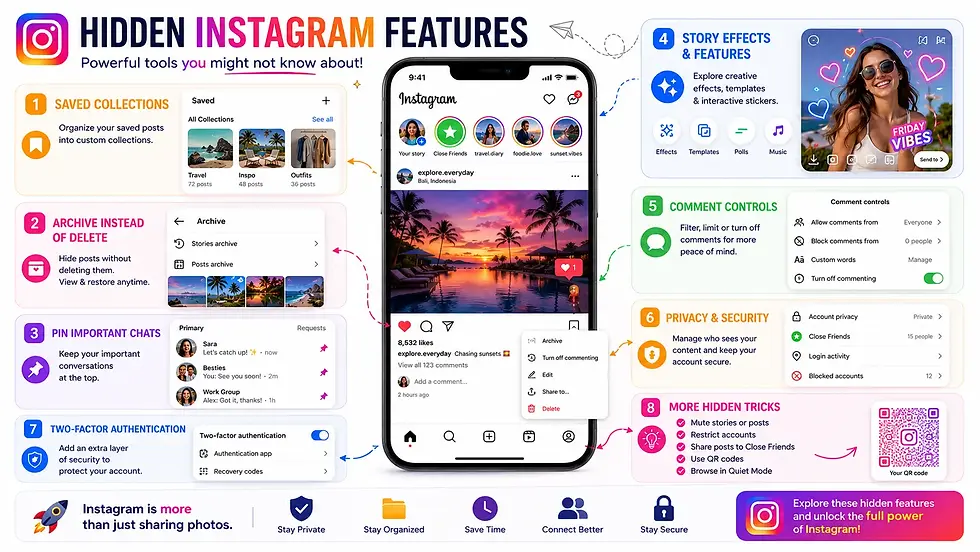
Instagram has evolved far beyond a simple photo-sharing platform. Today, it includes powerful tools for messaging, privacy, content creation, organization, and account management. While millions of people use Instagram daily, many of its most useful features remain hidden beneath menus and settings that users rarely explore.
Whether you're a casual user, content creator, or business owner, discovering these lesser-known features can improve your experience, protect your privacy, and help you get more out of the app. In this guide, we'll uncover some of the best hidden Instagram features that most users don't know about.
Why Instagram Offers More Than Just Social Sharing
Most people use Instagram for browsing Reels, sharing Stories, and posting photos.
However, the app also includes:
Privacy tools
AI-powered messaging features
Content management options
Account security settings
Creator tools
Organization features
Exploring these hidden options can make Instagram more secure, productive, and enjoyable to use.
Here Are Some Hidden Instagram Features You Should Try
Many of these features are built into Instagram but are easy to overlook.
Pin Important Chats
If you frequently message certain people, you can pin conversations to the top of your inbox.
This makes it easier to access important chats without scrolling through your messages every time.
Edit Messages After Sending
Made a typo or forgot something?
Instagram allows you to edit many recently sent messages within a limited time after sending them, reducing the need to delete and resend.
Schedule Messages
Instagram now lets users schedule direct messages in supported regions and versions of the app.
This feature is especially useful for creators, businesses, and users who want reminders or timed communication.
Restrict Accounts Without Blocking
Sometimes you don't want to block someone completely. The Restrict feature quietly limits interactions by:
Hiding certain comments
Moving messages to message requests
Reducing unwanted engagement
The restricted user isn't notified.
Hide Your Activity Status
If you don't want others to know when you're online, you can disable your activity status.
This prevents others from seeing when you were last active while also hiding their activity status from you.
Create a Close Friends List
Not every Story needs to be shared with everyone. The Close Friends feature lets you share Stories only with selected people.
It's ideal for:
Family
Close friends
Private groups
Download Your Instagram Data
Instagram allows users to request a copy of their account information.
The downloaded archive may include:
Photos
Videos
Messages
Comments
Profile information
Activity history
This is useful for backups and reviewing your account history.
Use Hidden Story Filters
Beyond the default Story effects, Instagram offers numerous filters and effects that many users never explore.
Browsing the Effects Gallery reveals thousands of creative options from Instagram and independent creators.
Archive Posts Instead of Deleting Them
If you no longer want a post visible on your profile, you don't have to delete it permanently.
Archiving a post:
Removes it from your profile
Preserves likes and comments
Allows restoration later
This is useful for reorganizing your profile without losing engagement.
Filter Comments Automatically
Instagram includes automatic comment filtering tools.
You can filter:
Offensive comments
Spam
Custom keywords
Hidden words
This feature helps maintain healthier conversations, especially for public accounts.
Organize Saved Posts into Collections
Instead of saving everything in one long list, Instagram lets you organize saved posts into collections.
Examples include:
Travel ideas
Recipes
Tech tips
Photography inspiration
This makes saved content much easier to revisit later.
Quiet Mode for Fewer Interruptions
Instagram's Quiet Mode helps reduce distractions by limiting notifications during selected hours.
It's particularly useful when:
Studying
Working
Sleeping
The app can automatically notify others that you're currently unavailable.
Improve Account Security with Two-Factor Authentication
One of Instagram's most valuable but overlooked features is Two-Factor Authentication (2FA).
Enabling 2FA adds an additional verification step during login, making it much harder for unauthorized users to access your account.
Check Login Activity
Instagram allows you to review where your account is currently logged in.
From the Security settings, you can:
View active devices
See approximate login locations
Sign out of unfamiliar sessions
This helps detect unauthorized access early.
Use Instagram Search More Effectively
Instagram's search isn't limited to usernames.
You can search for:
Topics
Hashtags
Places
Audio tracks
Products
Reels
Learning how to use search effectively makes discovering relevant content much easier.
Privacy Features Worth Reviewing
To better protect your account, consider reviewing:
Private account settings
Tagged photo approvals
Story audience controls
Comment permissions
Mention permissions
Message request settings
These options provide greater control over who can interact with your content.
Tips for Getting More Out of Instagram
To enhance your overall experience:
Review privacy settings regularly
Organize saved posts into collections
Use Close Friends for personal Stories
Enable Two-Factor Authentication
Archive instead of deleting old posts
Explore hidden Story effects
Keep your app updated
Small adjustments can significantly improve both usability and security.
Why These Hidden Features Matter
Many users only scratch the surface of what Instagram offers. Features like chat pinning, post archiving, account restrictions, advanced privacy controls, collections, and security tools can make the platform easier to use while giving you greater control over your account.
As Instagram continues introducing new AI-powered and creator-focused features, regularly exploring the app's settings can help you discover tools that improve both productivity and privacy.

Key Takeaways
Instagram includes a wide range of hidden features beyond posting photos and watching Reels. From advanced messaging tools and privacy controls to content organization and account security, these lesser-known options can help you use the platform more efficiently.
Taking a few minutes to explore these settings can enhance your overall Instagram experience while giving you better control over your content, interactions, and personal information.
Author: Kalyan Bhattacharjee
Category: Social Media | Tech Reviews | Productivity Tips
Expertise: Technology Analyst & Digital Research Writer
Source: Research-based content using publicly available technical resources and industry references
📚 Keep exploring - Here are more tech blogs you’ll love:


Comments