
How to Create a Sitemap for Better SEO and Indexing

Updated: Sep 16
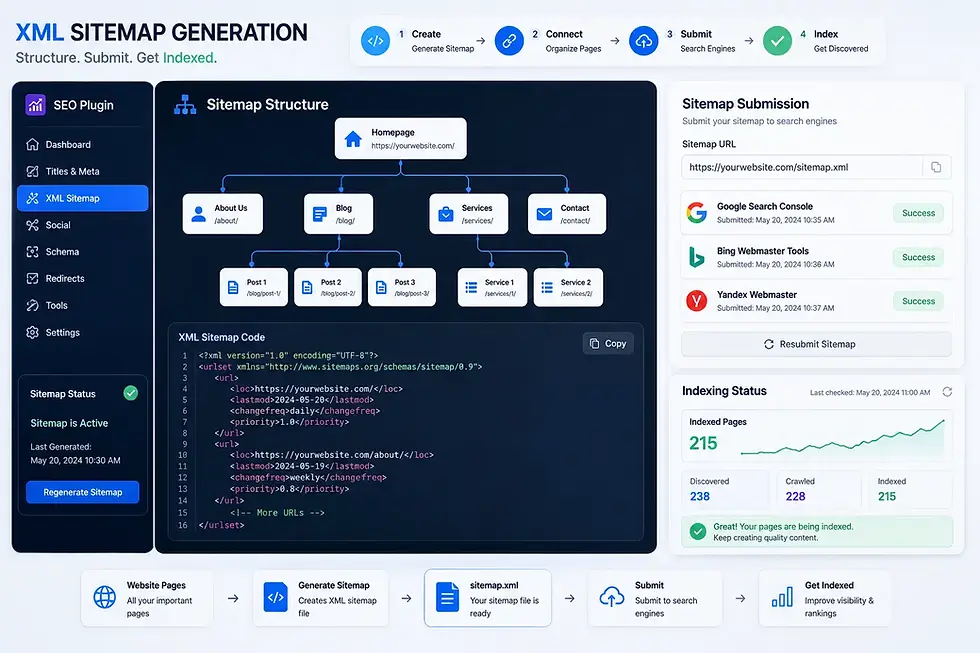
Let's Dive In | How to Create a Sitemap
A sitemap is one of the simplest yet most important SEO elements of a website. It helps search engines understand your site structure and discover important pages more efficiently. While modern search engines are good at crawling websites on their own, a proper sitemap can still improve:
URL discovery
Indexing efficiency
Site organization
SEO monitoring
This becomes especially useful for new websites, large blogs, e-commerce stores, sites with deep page structures, frequently updated content. The good news is that creating a sitemap today is much easier than it used to be.
What Is a Sitemap?
A sitemap is a file that lists important URLs on your website so search engines can crawl and index them more effectively. The most common type is:
XML sitemap
Which is designed specifically for search engines.
What does a Sitemap Include?
A sitemap may include:
Blog posts
Pages
Categories
Product URLs
Images
Videos
Most websites place the sitemap at a URL like:
https://yourwebsite.com/sitemap.xml
One common misconception is that sitemaps directly improve rankings. In reality, they mainly help search engines discover and organize content more efficiently.
Why Sitemaps Matter for SEO
Search engines use internal links to crawl websites, but they can sometimes miss pages, especially on:
large sites,
newer websites,
or poorly linked content.
A sitemap acts like a roadmap.
It Tells Search Engines
which pages exist,
when they were updated,
and which URLs are important.
From personal experience managing content-heavy websites, I’ve noticed that properly maintained sitemaps often help newer articles get discovered faster, particularly on rapidly growing blogs.
Types of Sitemaps
Different types of sitemaps serve different purposes, helping both search engines and users navigate website content more efficiently.
XML Sitemap
This is the standard sitemap used for SEO and search engines. It’s machine-readable and designed mainly for:
Google
Bing
Other search engines
This is the sitemap most website owners need.
HTML Sitemap
An HTML sitemap is designed for human visitors rather than search engines. It helps users navigate:
Categories
Pages
And important sections
Large websites sometimes use both XML and HTML sitemaps together.
Image and Video Sitemaps
Some websites also create specialized sitemaps for:
Images
Videos
News content
These are especially useful for media-heavy sites, publishers, and video platforms.
How to Create a Sitemap
You can create a sitemap using SEO plugins, online generators, manual XML coding, or built-in tools from website builders.
Using SEO Plugins (Easiest Method)
For most users, SEO plugins are the simplest option. Popular plugins like:
Yoast SEO
Rank Math
All in One SEO
Can automatically generate XML sitemaps. Once enabled, the sitemap updates automatically whenever new posts are published, pages are edited, or content changes. This is the method most WordPress websites use today because it requires very little technical setup.
Using Online Sitemap Generators
Several online tools can generate sitemaps automatically. Popular options include:
These tools scan websites and create sitemap files based on discovered URLs. This method works well for:
Static websites
Smaller projects
Or custom-built sites without CMS plugins.
However, manually generated sitemaps may require periodic updates.
Creating a Sitemap Manually
Advanced users can also create XML sitemaps manually.
A basic sitemap structure looks like this:
<?xml version="1.0" encoding="UTF-8"?>
<urlset xmlns="http://www.sitemaps.org/schemas/sitemap/0.9">
  <url>
    <loc>https://example.com/</loc>
  </url>
</urlset>
Manual sitemaps offer maximum control but are usually unnecessary for smaller websites. Most modern CMS platforms automate the process already.
Creating Sitemaps on Website Builders
Many website builders automatically generate sitemaps behind the scenes.
Platforms like:
Wix
Shopify
Squarespace
Typically create XML sitemaps automatically without requiring manual setup. For example, on many Wix sites, the sitemap is generated automatically once the site is published. This is one reason beginner-friendly website builders simplified SEO management significantly over the years.
How to Submit a Sitemap to Search Engines
After creating a sitemap, it’s best to submit it through:
Steps for Google Search Console
Open Google Search Console
Select your property
Go to “Sitemaps”
Enter your sitemap URL
Click Submit
Steps for Bing Webmaster Tools
Open Bing Webmaster Tools
Select your website
Navigate to “Sitemaps”
Submit your sitemap URL
Confirm submission
This helps Google and Bing discover the sitemap faster. It also allows website owners to monitor indexing status, crawl issues, and sitemap errors.
Common Sitemap Mistakes
Many sitemap problems come from poor maintenance rather than technical complexity. Common mistakes include:
Broken URLs
Redirect-heavy URLs
Including noindex pages
Duplicate URLs
Outdated sitemap entries
Another overlooked issue is excessively large sitemaps. Very large websites often split sitemaps into multiple sitemap indexes for better organization.
Best Practices for Sitemaps
To maintain a healthy sitemap:
Include only important indexable pages
Remove broken URLs
Keep sitemaps updated automatically
Use canonical URLs consistently
Monitor sitemap errors in Search Console
For SEO-focused websites, sitemap maintenance should become part of regular technical SEO checks rather than a one-time setup.

Key Takeaways
Creating a sitemap is one of the easiest technical SEO improvements website owners can implement. Whether you run a personal blog, business site, e-commerce store, or media platform, a properly configured sitemap helps search engines understand and crawl your content more efficiently. For most modern websites, automatic sitemap generation through SEO plugins or website builders is more than sufficient.
But understanding how sitemaps work still matters because they remain an important part of technical SEO and indexing management. In many cases, a sitemap will not dramatically improve rankings overnight, but it can help ensure your important pages are discovered, indexed, and maintained properly over time.
Author: Kalyan Bhattacharjee
Category: SEO & Marketing | Tech Tutorials | Productivity
Expertise: Technology Analyst & Digital Research Writer
Source: Research-based content using publicly available technical resources and industry references
📚 Keep exploring - Here are more tech blogs you’ll love:


Comments