.png)
Android System Intelligence: Features, Uses, and Privacy Explained

Updated: Sep 16

Overview | Android System Intelligence
Many Android users notice a system app called Android System Intelligence running in the background but have no idea what it actually does. Because the name sounds vague and technical, it often raises questions about privacy, battery usage, and whether the app is even necessary.
In reality, Android System Intelligence is an important part of modern Android features, especially on newer versions of Android. And unlike many Cloud-based AI systems, much of its processing happens directly on the device itself.
What Is Android System Intelligence?
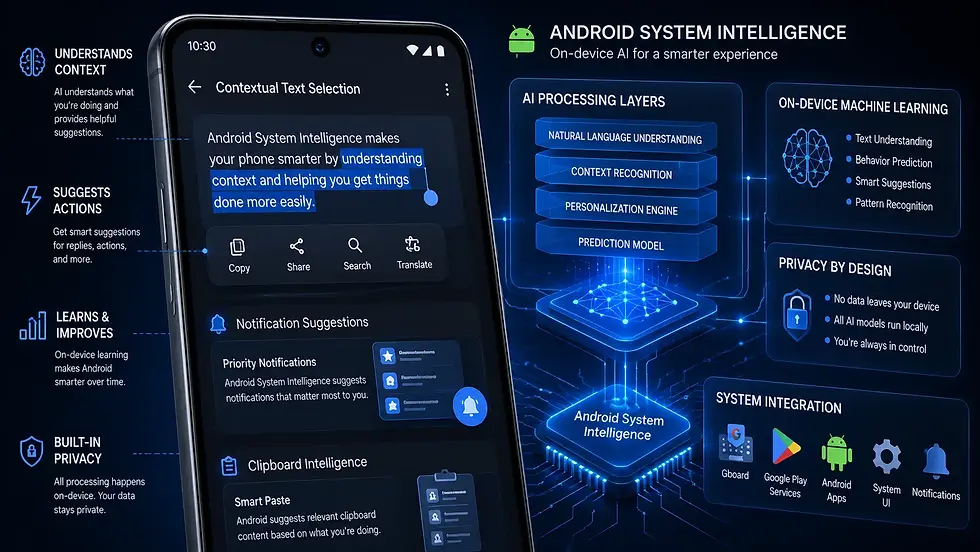
Android System Intelligence is a built-in Android system component developed primarily by Google that powers AI-driven and context-aware features across Android devices. Instead of being a standalone app users actively open, it works quietly in the background to improve everyday Android interactions.
Google gradually shifted many smart Android features into modular system components like this so they could receive updates through the Play Store without requiring full Android OS updates.
What Features Does Android System Intelligence Power?
Many users interact with Android System Intelligence daily without realizing it.
Smart Text Selection
When Android intelligently recognizes:
phone numbers,
addresses,
tracking numbers,
or links
During text selection, Android System Intelligence is often involved. For example, selecting an address may instantly suggest:
Opening Maps
Calling a number
Or searching the web
Live Caption
One of the most impressive Android accessibility features is:
Automatic real-time captions for media audio.
This feature can generate captions directly on-device without requiring cloud processing for many supported scenarios. That’s partially powered by Android System Intelligence.
Smart Replies and Notifications
Android’s suggested replies inside notifications also rely heavily on system intelligence features. The system analyzes message context locally and suggests quick responses such as:
“Thanks!”
“On my way”
“Sounds good”
Similarly, Android may prioritize or organize notifications based on usage behavior.
App Predictions
Some Android launchers predict which apps users are most likely to open next.
For example:
Maps during commuting hours
Music apps during workouts
Messaging apps during work breaks
Android System Intelligence helps power some of these prediction systems using on-device learning models.
Clipboard and Copy-Paste Enhancements
Modern Android versions can recognize copied content intelligently.
For instance:
Copied addresses,
URLs,
Or tracking numbers
May trigger smart suggestions automatically. This feature feels simple on the surface, but it relies heavily on contextual AI processing behind the scenes.
Why Google Moved Toward On-Device Intelligence
One major shift in recent Android development has been the move toward on-device AI processing. Instead of sending everything to cloud servers, many Android intelligence features now process data locally on the device itself.
This offers several advantages:
Better privacy
Faster response times
Reduced internet dependency
Lower cloud processing load
Specialized AI Hardware Inside Modern Smartphones
Interestingly, modern smartphones now include specialized AI hardware components such as:
NPUs (Neural Processing Units)
AI accelerators
Tensor cores
Designed specifically for machine learning tasks. Without these hardware improvements, many real-time Android intelligence features would be much slower or more battery-intensive.
Does Android System Intelligence Affect Battery Life?
Under normal conditions, battery impact is usually minimal. However, some users occasionally notice higher battery usage, background activity, or unusual resource consumption. This can happen because Android System Intelligence continuously interacts with:
Notifications
App behavior
Language models
Contextual processing systems
In most cases, excessive battery drain is temporary and often stabilizes after, system optimization, cache rebuilding, or Play Services updates.
Can You Disable Android System Intelligence?
Technically, some devices allow users to disable or restrict it partially. However, doing so may break or reduce functionality for:
Smart Reply
Live Caption
Intelligent notifications
Context-aware suggestions
App prediction systems
On stock Android and Google Pixel devices especially, Android System Intelligence is deeply integrated into the operating system experience. Many users who disable it later notice missing smart features without immediately realizing why.
Privacy Concerns and Misconceptions
Because the app works with contextual data, some users assume it constantly sends personal information to Google servers.
But much of Android System Intelligence focuses specifically on:
Local processing,
On-device machine learning,
Privacy-preserving AI workflows.
That doesn’t mean all Android intelligence features are completely offline, but Google has increasingly emphasized local AI processing in recent Android versions. This shift became more visible as privacy concerns around cloud-based data collection grew globally.
Why Android System Intelligence Matters
Android today is far more context-aware than older Android versions from the Android 5 or Android 6 era. Features that now feel “normal” - such as:
Smart suggestions
Contextual actions
Real-Time captions
Predictive behavior
Require continuous machine learning support behind the scenes. Android System Intelligence acts as one of the core components enabling those experiences.
Closing Notes
Android System Intelligence is one of the lesser-known but increasingly important components of modern Android devices. While most users never interact with it directly, it powers many of the smart features people use every day, including Live Caption, Smart Reply, intelligent text selection, and app predictions.
As Android continues moving toward more on-device AI and contextual computing, system components like Android System Intelligence will likely become even more important in future Android versions. For most users, it’s best viewed not as unnecessary background software, but as part of the infrastructure that makes modern Android devices feel smarter and more responsive.
Author: Kalyan Bhattacharjee
Category: Android Guide | Tech Reviews | Artificial Intelligence
Expertise: Technology Analyst & Digital Research Writer | 5+ Years of Experience
Source: Research-based content using publicly available technical resources and industry references
📚 Keep exploring - Here are more tech blogs you’ll love:


Comments