.png)
301 vs 302 Redirects: What's the Difference and Which One Should You Use?

Updated: Sep 16
Introduction | 301 vs 302 Redirects
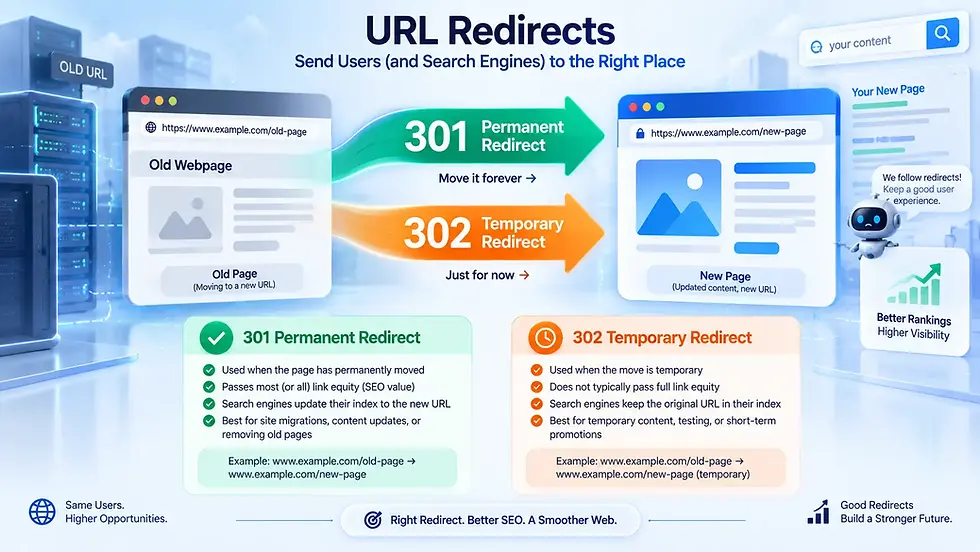
Changing a website URL may seem simple, but what happens to the old URL matters just as much as the new destination. This is where HTTP redirects come in. 301 and 302 redirects both send visitors to another URL, but they communicate different signals to browsers and search engines. A 301 redirect indicates a permanent move, while a 302 redirect indicates a temporary one.
Choosing the wrong type can lead to unnecessary SEO and indexing issues. In this guide, we'll explain their differences, how they work, their SEO impact, common use cases, mistakes to avoid, and how to choose the right redirect.
What Is a URL Redirect?
A URL redirect tells a browser or other client that the requested resource is available at a different URL. When someone visits an old URL, the server responds with a redirect status code and provides the destination URL through the Location header. The browser can then request the new URL automatically.
For example, imagine you move an article from:
example.com/old-article
to:
example.com/new-article
Instead of leaving visitors with a broken page, you can redirect the old URL to the new one. Redirects are useful when:
You change a page's URL
You reorganize website content
You move a website to a new domain
You consolidate duplicate pages
You change URL structures
You temporarily move content
You switch between domain versions such as HTTP and HTTPS
The important question is whether the change is permanent or temporary. That's where 301 and 302 differ.
301 vs 302 Redirects: The Key Difference
The simplest way to remember the difference is:
301 = permanent move
302 = temporary move
A 301 response means the requested resource has permanently moved to another URL. A 302 response indicates that the resource is temporarily available at another URL and the original URL may be used again later.
Feature | 301 Redirect | 302 Redirect |
Meaning | Moved permanently | Moved temporarily |
Intended duration | Permanent | Temporary |
Common use | URL changes, site migrations | Temporary campaigns, testing, maintenance |
Search engines | Signals that the new URL should replace the old one | Signals that the original URL should remain relevant |
SEO signals | Can be transferred to the new URL | Generally does not transfer the same permanent signals |
Original URL | Usually replaced | Intended to remain in use |
Google recommends server-side permanent redirects such as 301 or 308 when permanently moving URLs. Google also states that permanent redirects do not cause a loss of PageRank.
What Is a 301 Redirect?
A 301 Moved Permanently response tells clients and search engines that a resource has permanently moved to a new URL.
For example:
oldsite.com/blog/seo-guide
↓
newsite.com/blog/seo-guide
If the old URL should no longer be the primary address, a 301 redirect is generally the appropriate choice.
When Should You Use a 301 Redirect?
Use a 301 when the URL change is intended to be permanent. Common examples include:
Changing a page URL permanently
Renaming a blog post's slug
Moving content to a new section
Migrating from one domain to another
Moving from HTTP to HTTPS
Changing your domain structure
Consolidating duplicate pages
Permanently replacing an old product page
Restructuring your website
For example, if you change:
example.com/best-budget-phones
to:
example.com/best-budget-smartphones
And don't intend to restore the old URL, a 301 redirect makes sense.
Why 301 Redirects Matter for SEO
A 301 tells search engines that the old URL has permanently moved.
Google's documentation recommends permanent server-side redirects for site moves and states that 301 and other permanent redirects don't cause a loss of PageRank. This makes 301 redirects particularly important when an existing page has:
Backlinks
Search visibility
Bookmarks
External references
Internal links
Existing traffic
Without an appropriate redirect, visitors following an old link could encounter a 404 page instead.
What Is a 302 Redirect?
A 302 Found response indicates that the requested resource has temporarily moved to another URL. The key idea is that the original URL is still expected to be used.
For example, imagine you're temporarily sending visitors from:
example.com/product
to:
example.com/product-sale
While a promotional campaign is running. If the original URL will become active again after the campaign, a temporary redirect may be appropriate.
When Should You Use a 302 Redirect?
Use a 302 when the change is genuinely temporary.
Typical examples include:
Temporary promotions
Short-term landing pages
Temporary website maintenance
Temporary experiments
Testing an alternative destination
Temporarily redirecting visitors while content is unavailable
The important point is that you're not replacing the original URL permanently. If you know the old URL will never be used again, a 302 is usually not the appropriate signal.
301 vs 302 Redirects: Which Is Better for SEO?
Neither redirect is inherently "better." The correct redirect depends on your situation. A 301 is designed to communicate a permanent URL change, while a 302 communicates a temporary change.
For a permanent migration, Google recommends server-side permanent redirects such as 301 or 308. Google also advises keeping redirects in place for a long period, generally at least one year, to allow signals associated with the old URLs to transfer and for crawlers to process the changes.
The mistake is not choosing a 302 instead of a 301 because one is universally worse. The mistake is using a temporary redirect when the move is actually permanent.
How Do 301 and 302 Redirects Work?
The basic process looks like this:
User requests old URL
↓
Server returns a redirect response
↓
Response includes the new URL in the Location header
↓
Browser requests the destination URL
↓
Server returns the requested page
For example:
GET /old-page

HTTP/1.1 301 Moved Permanently
Location: https://example.com/new-page
The browser then requests /new-page. The extra request introduces some overhead, which is one reason you shouldn't unnecessarily create redirect chains.
301 vs 302: Real-World Examples
Understanding the difference becomes easier when you look at practical situations.
Situation | Recommended Redirect |
Permanently changing a blog URL | 301 |
Moving a website to a new domain | 301 |
Permanently changing HTTP to HTTPS | 301 |
Renaming a permanent product URL | 301 |
Consolidating two permanent pages | 301 |
Temporary promotional campaign | 302 |
Temporary maintenance page | 302 |
Short-term URL experiment | 302 |
Temporarily sending traffic to another page | 302 |
The deciding factor is simple: Will the original URL come back?
If no, think 301.
If yes, a 302 may be appropriate.
Common 301 and 302 Redirect Mistakes
Redirects are technically simple, but poor implementation can create SEO and usability problems.
Using 302 for a Permanent URL Change
This is one of the most common mistakes.
If you've permanently changed a URL but leave a 302 redirect in place, you're sending a temporary signal when the move is actually permanent. If the old URL has been permanently replaced, use a permanent redirect such as 301.
Using 301 for a Temporary Change
The opposite mistake can also cause problems.
If you're running a temporary campaign and plan to restore the original destination, don't treat the temporary change as a permanent migration. Use a temporary redirect when the original URL is expected to remain the primary location.
Creating Redirect Chains
A redirect chain occurs when one redirect points to another redirect.
For example:
Page A → Page B → Page C
A cleaner setup is:
Page A → Page C
Google recommends avoiding redirect chains and advises keeping them short when they cannot be avoided because each additional redirect adds latency.
Redirecting Everything to the Homepage
When deleting or restructuring content, it can be tempting to redirect every old URL to the homepage.
That's usually not the best approach, A redirect should ideally lead to a relevant replacement.
For example:
/old-smartphone-guide → /new-smartphone-guide
Makes more sense than:
/old-smartphone-guide → /
The destination should provide a reasonable continuation for someone who followed the original URL.
Forgetting Internal Links
Redirects can keep old URLs functional, but that doesn't mean you should leave your internal links pointing to redirected URLs.
If you control the links on your website, update them to point directly to the final destination. This reduces unnecessary requests and helps keep your site's internal architecture cleaner. MDN also recommends correcting internal links rather than relying on redirects when possible.
How to Use 301 Redirects During a Website Migration
Website migrations are one of the most important situations where 301 redirects matter.
Suppose you're moving:
oldsite.com/article
to:
newsite.com/article
Create a URL mapping before launching the new site.
Old URL | New URL | Redirect |
/old-article | /new-article | 301 |
/old-guide | /new-guide | 301 |
/old-product | /new-product | 301 |
Google recommends creating a URL mapping, implementing server-side permanent redirects, updating internal links, submitting the new sitemap, and monitoring the migration in Search Console.
Don't simply redirect the entire old website to the homepage unless that genuinely represents the appropriate destination.
What About 307 and 308 Redirects?
301 and 302 aren't the only HTTP redirect codes. You may also encounter 307 Temporary Redirect and 308 Permanent Redirect.
The main distinction is how HTTP methods are handled. A 307 is the temporary equivalent that preserves the original request method, while a 308 is the permanent equivalent that also preserves the original method and request body.
For most conventional website URL migrations involving normal page requests, 301 is still a familiar and widely used choice. If you're dealing with APIs, forms, or non-GET requests, the method-preserving behavior of 307 and 308 can become more important.
How Long Should You Keep a 301 Redirect?
For important URL migrations, don't remove redirects immediately after search engines discover the new URLs. Google recommends keeping redirects for at least one year during site moves so its systems have time to process the change and transfer signals to the new URLs.
From a practical perspective, keeping useful redirects longer can also help visitors who have old bookmarks or websites that still link to the previous URL. However, you should still update your own internal links so they point directly to the final URL.
A Simple Rule for Choosing Between 301 and 302
If you're unsure which redirect to use, ask one question:
Is the URL change permanent?
Yes → Use 301
Examples:
Permanent URL change
Website migration
Domain change
Permanent content consolidation
Permanent HTTP-to-HTTPS redirect
No → Use 302
Examples:
Temporary campaign
Temporary maintenance
Short-term experiment
Temporary destination change
This simple distinction will solve most 301 vs 302 decisions.
Best Practices for Using Redirects
To keep redirects technically clean and SEO-friendly:
Use 301 for permanent URL changes.
Use 302 when the change is genuinely temporary.
Prefer server-side redirects.
Redirect directly to the final destination.
Avoid long redirect chains.
Update internal links after changing URLs.
Redirect old URLs to relevant replacement pages.
Keep important migration redirects for at least one year.
Monitor redirects and crawl errors after major changes.
Use Google Search Console when performing significant site migrations.
Google specifically recommends server-side permanent redirects for site moves and advises keeping redirect chains short.

Key Takeaways
The difference between a 301 and 302 redirect comes down to one fundamental question: Is the URL change permanent or temporary? A 301 redirect tells browsers and search engines that a resource has permanently moved and is generally the right choice for permanent URL changes, site migrations, and content restructuring.
A 302 redirect communicates that the change is temporary and that the original URL may become active again. Choosing the right status code helps search engines understand your intentions and prevents unnecessary confusion during URL changes. When implementing redirects, focus not only on the status code but also on the destination, redirect chains, internal links, and long-term maintenance.
In short:
Permanent move? Use 301.
Temporary move? Use 302.
That simple distinction can prevent many unnecessary SEO and website-management problems.
Frequently Asked Questions
Here are some common questions about 301 and 302 redirects, their SEO impact, practical use cases, and how to choose the right redirect.
Is a 301 redirect better than a 302 redirect?
Ans: Neither is universally better. A 301 is appropriate for permanent URL changes, while a 302 is intended for temporary changes. The correct choice depends on what you want search engines and browsers to understand about the URL.
Does a 301 redirect pass SEO value?
Ans: Yes. Google states that permanent redirects such as 301 and 308 don't cause a loss of PageRank.
Can I change a 302 redirect to a 301 later?
Ans: Yes. If a temporary URL change becomes permanent, you can update the redirect to a permanent status code such as 301.
Should I redirect an old page to the homepage?
Ans: Only when the homepage is genuinely the most relevant destination. In most cases, redirecting an old URL to a closely related replacement page provides a better experience.
Do redirects slow down a website?
Ans: Redirects add another HTTP request, which introduces some latency. That's why it's better to link directly to the final URL and avoid unnecessary redirect chains.
What is the difference between 301 and 308?
Ans: Both indicate a permanent redirect, but 308 preserves the original HTTP request method and body, while 301 can allow the method to change in certain situations.
What is the difference between 302 and 307?
Ans: Both are temporary redirects, but 307 guarantees that the original request method and body are preserved, whereas 302 may allow the method to change in certain situations.


Comments